
About Me
I am Muhammad Awais , a Senior Research Associate in Cybersecurity & Systems with a PhD from Lancaster University. My work centres on the design and evaluation of secure, trusted, and resilient computing systems, with particular emphasis on security, privacy, and system-level optimisation within complex networked environments. I contribute to funded research programmes, high-impact publications, and interdisciplinary collaborations. My doctoral research addressed sustainable and energy-efficient resource scheduling for integrated NTN and UAV-assisted 6G systems, focusing on improving QoS, latency, and overall system efficiency. Alongside research, I have supported undergraduate and postgraduate teaching in Software Development (Java), Broadband Communication, Advanced Communication Systems, and SQL, and contributed to academic leadership through an Assistant Dean role. I am especially interested in translating AI-enabled optimisation and systems research into dependable, real-world solutions, supporting secure digital infrastructure, cyber-physical systems, and next-generation networks. I have authored 30+ peer-reviewed publications, regularly review for leading IEEE journals, and actively welcome collaborative research in cybersecurity, trusted systems, and resilient computing infrastructures.
You can fork this template right now, modify the configuration and Markdown files, add your own PDFs and other content, and have your own site for free, with no ads! For those users that need more advanced functionality, the template also supports the following popular tools:
Getting started
- Register a GitHub account if you don’t have one and confirm your e-mail (required!)
- Fork this template by clicking the “Use this template” button in the top right.
- Go to the repository’s settings (rightmost item in the tabs that start with “Code”, should be below “Unwatch”). Rename the repository “[your GitHub username].github.io”, which will also be your website’s URL.
- Set site-wide configuration and create content & metadata (see below – also see this set of diffs showing what files were changed to set up an example site for a user with the username “getorg-testacct”)
- Upload any files (like PDFs, .zip files, etc.) to the files/ directory. They will appear at https://[your GitHub username].github.io/files/example.pdf.
- Check status by going to the repository settings, in the “GitHub pages” section
Site-wide configuration
The main configuration file for the site is in the base directory in _config.yml, which defines the content in the sidebars and other site-wide features. You will need to replace the default variables with ones about yourself and your site’s github repository. The configuration file for the top menu is in _data/navigation.yml. For example, if you don’t have a portfolio or blog posts, you can remove those items from that navigation.yml file to remove them from the header.
How to edit your site’s GitHub repository
Many people use a git client to create files on their local computer and then push them to GitHub’s servers. If you are not familiar with git, you can directly edit these configuration and Markdown files directly in the github.com interface. Navigate to a file (like this one and click the pencil icon in the top right of the content preview (to the right of the “Raw | Blame | History” buttons). You can delete a file by clicking the trashcan icon to the right of the pencil icon. You can also create new files or upload files by navigating to a directory and clicking the “Create new file” or “Upload files” buttons.
Example: editing a Markdown file for a talk 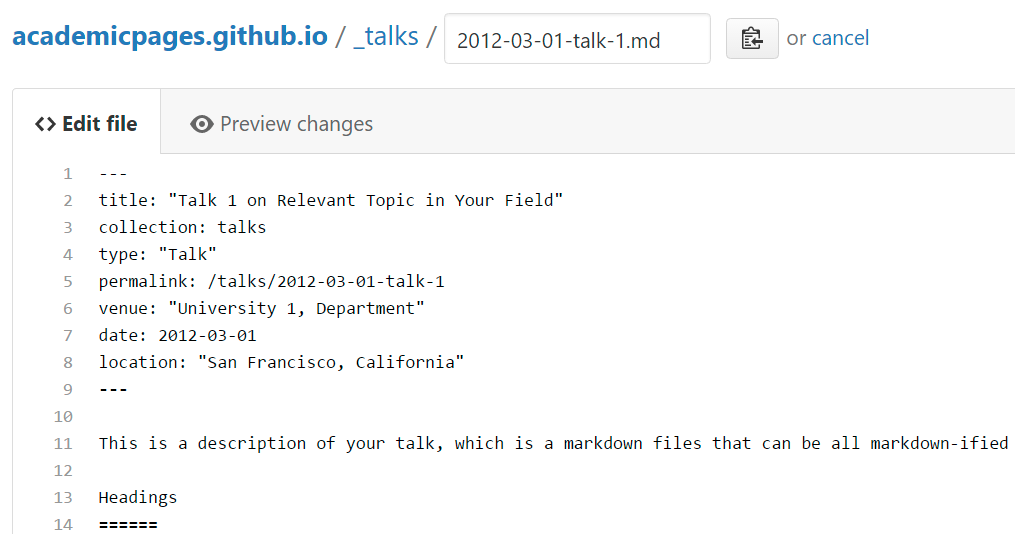
For more info
More info about configuring Academic Pages can be found in the guide, the growing wiki, and you can always ask a question on GitHub. The guides for the Minimal Mistakes theme (which this theme was forked from) might also be helpful.